Phoenix Rob Run Internal cheat
Memory Aim, Silent Aim and wide ESP
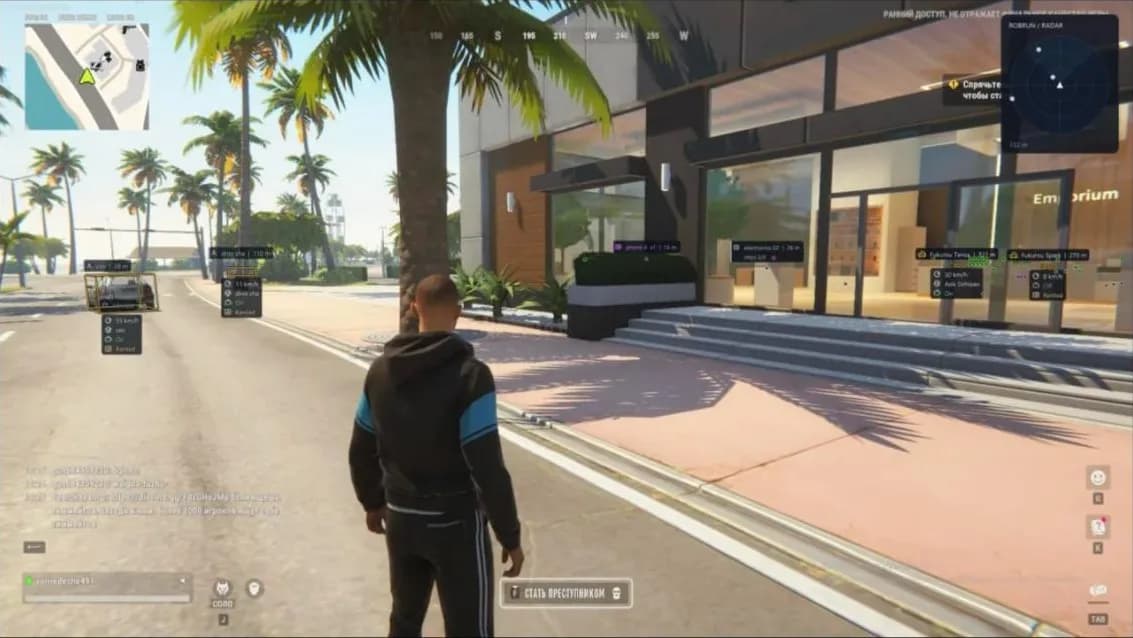
Phoenix Rob Run Internal is a software key for Rob Run labelled Internal by its supplier, Phoenix. You can pick Memory Aim or Silent Aim, choose target categories (police, robbers, civilians and others) and tune bone selection, FOV, smoothing, prediction and priority.
The ESP list is wide: players with wanted status and HP, vehicles with driver and owner, bots, loot nodes, cargo and security panels, cameras with detection zones, plus a radar. Extras include a free camera, a skin changer, battle mode and a config system.
- Memory Aim or Silent Aim with bone and FOV settings
- Player ESP with wanted status, HP bar and armor
- Vehicle, bot, loot and camera ESP
- Radar with factions, NPCs and vehicles
- No Recoil, No Sway, No Spread and free camera
- Skin changer, battle mode and config system
Full feature list
Aimbot
- Memory Aim or Silent Aim
- Target categories: police, robbers, civilians and others
- Bone selection (head, neck, chest, pelvis), random bones, head chance
- FOV, draw FOV, smooth, prediction, lead time, target priority
- Max distance, target switch delay, team check, ignore dead, readiness check
Player ESP
- Box (regular or corner), skeleton, head marker, screen glow
- Name, distance, weapon, state, wanted status, HP bar and text, armor, snaplines
- Hide self, team and dead, max distance
Vehicle ESP
- Name, driver, owner, speed, engine state, cargo, trunk, rental
- Box (regular, corner, 3D), fill box, snaplines, occupied only, own only
Bots ESP
- Name, state, box, distance, hide dead
Loot ESP
- Items, bags, loot nodes, money nodes
- Cargo, chargers, storage units, security panels
- Name, distance, count, state, markers, category filters, rarity colors, hide empty
Camera ESP
- Cameras with name, box, state and detection zones
- Separate colors for active, broken and alert cameras, hide broken
Radar Hack
- Factions, NPCs and vehicles, rotate with camera, auto zoom, names, range rings, view sector
Exploits
- No Recoil, No Sway, No Spread
- Fast loot nodes, interaction range
- Free camera
HUD
- Faction warnings when someone approaches, aim arrows
- Open doors and gates warnings at your own base, base direction
Other
- Skin changer, battle mode, visual presets, clean screen
- Config system, performance limits
- Menu in Russian and English
Requirements and notes
- Operating system: Windows 10 and Windows 11
- Processor: AMD and Intel
- Video card: NVIDIA and AMD
- Client: Steam
Mandatory step: turn TPM off in the BIOS
TPM must be off for Rob Run. Follow the steps in order.
- Turn BitLocker off first. Type “Manage BitLocker” in the Start menu (Windows Home: Settings > Privacy & security > Device encryption). If it is on, save your recovery key somewhere outside this PC, turn encryption off and wait until it finishes. If you skip this, Windows asks for the recovery key once TPM is off, and without that key you cannot get to your files.
- Make sure you know your Windows account password. The sign-in PIN may stop working once TPM is off.
- Restart the PC and enter the BIOS (usually Del or F2 during startup).
- In the Security, Advanced or Trusted Computing menu set TPM to Disabled. On Intel it is usually called Intel PTT, on AMD AMD fTPM. Do not use “Clear TPM”.
- Save and exit (usually F10). In Windows press Win + R and type tpm.msc: it should say “Compatible TPM cannot be found”.
System requirements
- Operating system
- Windows 10 / 11
- Processor
- Intel or AMD
- Other
- Setup needs Hyper-V (Windows Pro) and security software turned off, see the setup guide
How to start after you buy
- Pay on the NOWPayments page
- Open your order page: your key appears when the payment is confirmed
- Follow the setup guide and run the loader as administrator
- Enter your key and start Rob Run
Product questions
The supplier's list has Memory Aim and Silent Aim, player, vehicle, bot, loot and camera ESP, a radar, No Recoil / No Sway / No Spread, a free camera, HUD warnings, a skin changer, battle mode and a config system. The full list is on this page.
Windows 10 or 11, an AMD or Intel processor, an NVIDIA or AMD video card and the Steam client.
24 hours, 1 week and 1 month.
As soon as the crypto payment is confirmed. Your order page shows the key automatically.
Turn V-SYNC on in the game settings and lower the in-game graphics settings. If the problem stays, open a ticket on Discord with your order number and a screenshot.