Disconnect Rob Run cheat
External aimbot, ESP and a full config system
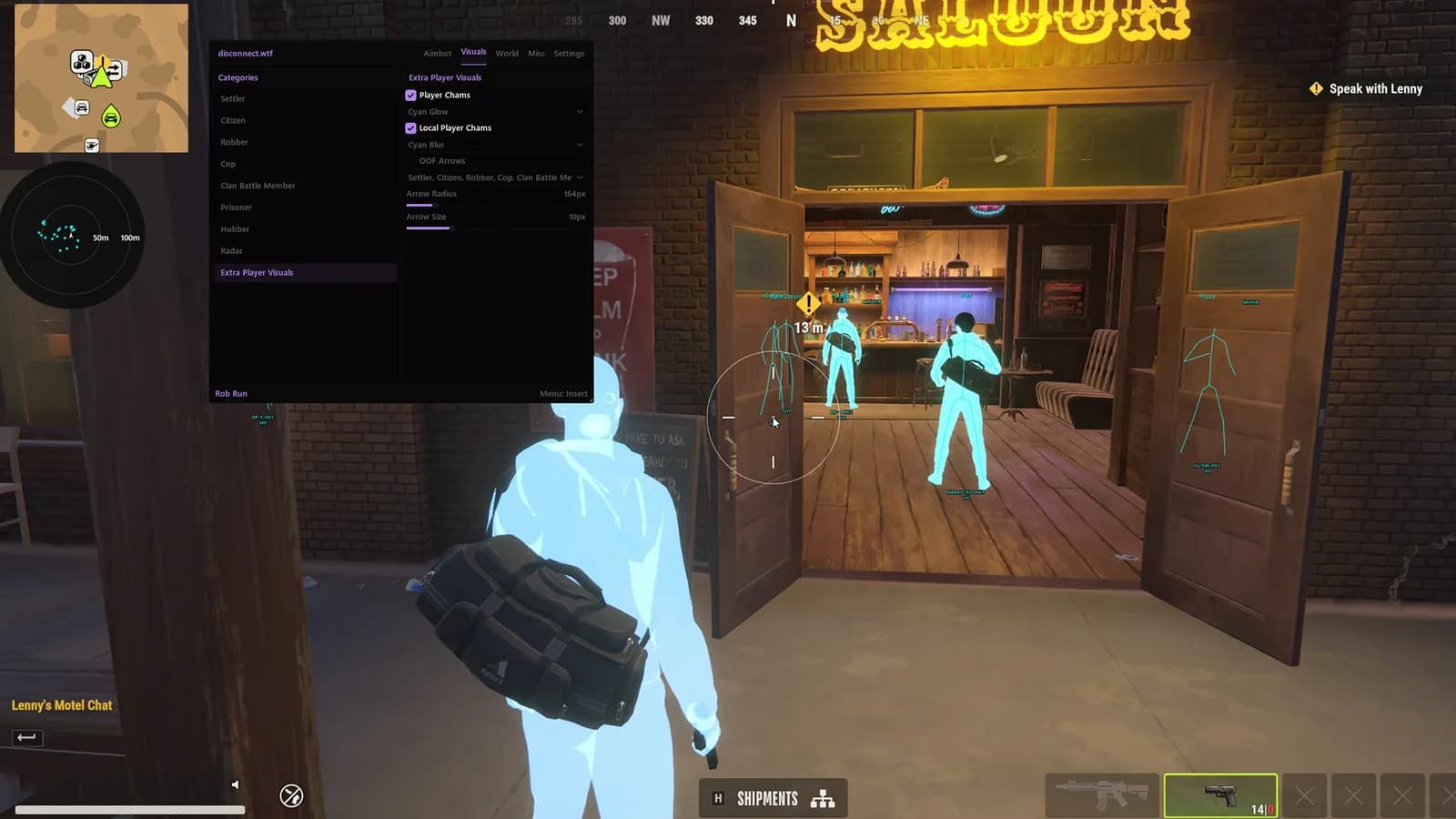
Disconnect Rob Run is a software key for Rob Run, an external made by the Disconnect team. It offers a normal aimbot and Silent Aim with hitchance, bone selection, role and team filters, a visibility check, smoothing and a dynamic FOV circle. The supplier lists 160 features in 14 groups, and the cheat is hidden from game capture (streamproof).
Beyond players it covers loot with value and rarity filters, bodybags with a despawn countdown, vehicles with their owner, cargo, ATMs, cameras, alarms, bases, storage, garages and workbenches with timers. There is a standalone radar, off-screen arrows, chams, a free camera, zoom, Battle Mode and Legit / Rage config slots you can export and import through the clipboard.
- Normal aimbot and Silent Aim with hitchance and bone selection
- Player ESP with skeleton, boxes, names, armor and status indicators
- Loot, bodybag, vehicle, base and workbench ESP
- Standalone, map and minimap radar plus off-screen arrows
- Streamproof: hidden from game capture
- Config slots with clipboard import and export
Full feature list
Aimbot
- Normal Aimbot
- Silent Aim
- Silent Aim Hitchance
- Custom Aim Keybind
- Aim Bone Selection
- Player Role and Team Filters
- Visibility Check
- Ignore Knocked Players
- Keep Target
- Aimbot Smoothing
- Aimbot Humanization
- Aimbot Deadzone
- Adjustable Aim Radius
- Maximum Aim Distance
- Customizable FOV Circle
- Dynamic FOV Circle
- Customizable Target Line
- Target Line Only While Active
Player ESP
- Skeleton ESP
- Box ESP
- Player Names
- Distance ESP
- Clan Tags
- Held Item ESP
- Visibility Check
- Visible and Hidden Colors
- Custom Team and Friend Color
- Reloading Indicator
- In-Vehicle Indicator
- Armor Indicator
- Crouching Indicator
- Sprinting Indicator
- Knocked Indicator
- Individual Player Role Settings
- Adjustable Render Distance
Radar
- Standalone Radar
- Map Radar
- Minimap Radar
- Combined Map and Minimap Mode
- Player Role Filters
- Vehicle Type Filters
- Custom Player and Vehicle Colors
- Show Teammates
- Distance Visualizer
- Orientation Lock
- Adjustable Radar Position
- Adjustable Radar Radius
- Adjustable Render Distance
- Adjustable Indicator Size
- Custom Background Color
- Adjustable Background Opacity
Off-Screen Arrows
- Off-Screen Player Arrows
- Player Role Filters
- Role-Based Colors
- Adjustable Arrow Size
- Adjustable Arrow Radius
Chams
- Player Chams
- Local Player Chams
- Independent Material Selection
Loot ESP
- Loot Names
- Loot Distance
- Loot Value Display
- Minimum Loot Value Filter
- Category and Rarity Filtering
- Custom Category and Rarity Colors
- Weapon and Ammo ESP
- Armor and Equipment ESP
- Medicine and Grenade ESP
- Key and Tool ESP
- Cash and Valuable ESP
- Other Item ESP
- Adjustable Render Distance
Bodybag ESP
- Bodybag ESP
- Bodybag Names
- Bodybag Distance
- Despawn Countdown
- Custom Bodybag Color
- Adjustable Render Distance
Vehicle ESP
- Car ESP
- Police Car ESP
- Van ESP
- Helicopter ESP
- Vehicle Names
- Vehicle Distance
- Vehicle Owner Display
- Individual Vehicle Type Filters
- Custom Vehicle Type Colors
- Adjustable Render Distance
World Object ESP
- Cargo ESP
- Container ESP
- ATM ESP
- Door ESP
- Hide Spot ESP
- Camera ESP
- Alarm ESP
- Hacked Camera Filter
- Disabled Camera Filter
- Hacked Alarm Filter
- Object Distance Display
- Custom Object Colors
- Individual Render Distances
Base ESP
- Base Overview
- Base Owner Display
- Base Clan Display
- Base Status
- Building ESP
- Storage ESP
- Storage Contents
- Base Cargo ESP
- Base Cargo Contents
- Defense ESP
- Defense Status and Timers
- Garage ESP
- Garage Contents
- Names and Distances
- Custom Colors
- Individual Render Distances
Workbench ESP
- Workbench ESP
- Workbench Contents
- Workbench Status
- Workbench Timers
- Laundering Desk
- Cargo Opening
- Cargo Exchange
- Production
- Grow Table
- Crypto Farm
- Individual Type Filters and Colors
- Names and Distances
- Adjustable Render Distance
Misc
- Instant Loot Search
- Freecam
- Custom Freecam Toggle Keybind
- Adjustable Freecam Speed
- FOV Changer
- Adjustable Field of View
- Zoom
- Custom Zoom Keybind
- Adjustable Zoom FOV
- Battle Mode
- Custom Battle Mode Keybind
Lobby & Friends
- Lobby Player List
- Player Search
- Player Role Display
- Player and Friend Counts
- Add and Remove Friends
- Saved Friends List
- Online and Offline Status
- Friend Highlighting
Menu & Configs
- Custom Menu Accent Color
- Custom Menu Keybind
- Resizable Menu
- Separate Top, Bottom, and General ESP Fonts
- Tahoma, Verdana, and Small Fonts
- Text Outlines
- Text Drop Shadows
- Legit, Rage, and Other Config Slots
- Config Save and Load
- Clipboard Config Export
- Clipboard Config Import
Mandatory step: turn TPM off in the BIOS
TPM must be off for Rob Run. Follow the steps in order.
- Turn BitLocker off first. Type “Manage BitLocker” in the Start menu (Windows Home: Settings > Privacy & security > Device encryption). If it is on, save your recovery key somewhere outside this PC, turn encryption off and wait until it finishes. If you skip this, Windows asks for the recovery key once TPM is off, and without that key you cannot get to your files.
- Make sure you know your Windows account password. The sign-in PIN may stop working once TPM is off.
- Restart the PC and enter the BIOS (usually Del or F2 during startup).
- In the Security, Advanced or Trusted Computing menu set TPM to Disabled. On Intel it is usually called Intel PTT, on AMD AMD fTPM. Do not use “Clear TPM”.
- Save and exit (usually F10). In Windows press Win + R and type tpm.msc: it should say “Compatible TPM cannot be found”.
System requirements
- Operating system
- Windows 10 / 11
- Processor
- Intel or AMD
- Other
- Setup needs Hyper-V (Windows Pro) and security software turned off, see the setup guide
How to start after you buy
- Pay on the NOWPayments page
- Open your order page: your key appears when the payment is confirmed
- Follow the setup guide and run the loader as administrator
- Enter your key and start Rob Run
Product questions
The supplier's list has a normal aimbot and Silent Aim, player ESP and chams, a radar with off-screen arrows, loot, bodybag, vehicle, object, base and workbench ESP, a free camera, zoom, Battle Mode, a lobby list with saved friends, and a config system. The full list is on this page.
Windows 10 or 11 with an Intel or AMD processor; no USB or extra Windows feature is needed; TPM must be turned off in the BIOS (required). Discord must be running with Legacy Overlay turned on and Enable Overlay turned off. Uninstall Riot Vanguard and FACEIT Anti-Cheat first. The setup guide shows every step.
1 day, 3 days, 1 week, 1 month and lifetime.
As soon as the crypto payment is confirmed. Your order page shows the key and the loader link automatically.
Turn V-SYNC on in the game settings and lower the in-game graphics settings. If the problem stays, open a ticket on Discord with your order number and a screenshot.