Harman Rob Run cheat
The full Rob Run menu
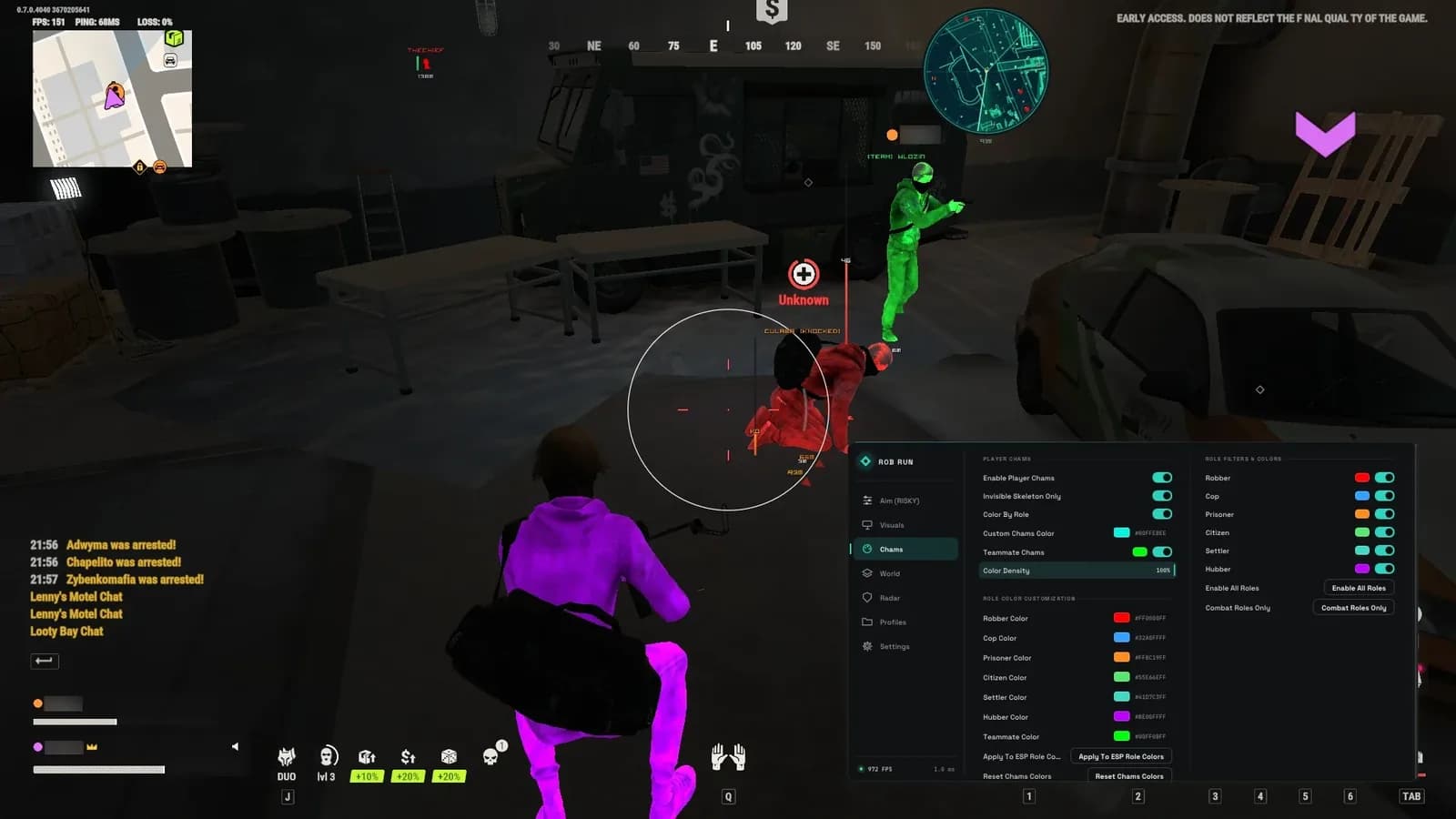
Harman Rob Run is a loader-based software for Rob Run with a six-tab in-game menu: Aim, Visuals, Chams, World, Radar and Profiles. It combines memory aimbot and silent aim with player and world ESP, so you can see who is around you, which role they play and where the loot is.
The latest update added Freecam, FOV Changer, Instant Search and Perfect Visible Check, plus chams that color player models by role. Every setting is saved in profiles you can export and share.
- Memory aimbot and silent aim with separate keys
- Player, loot, cash, ATM and vehicle ESP
- Chams with a color for every role
- 2D radar and one-key Battle Mode
- Freecam and FOV changer
- Profiles with config export and import
Full feature list
Aimbot
- Memory Aimbot (camera lock aiming)
- Silent Aim (bullet redirection without camera movement)
- Configurable Aimbot key
- Configurable Silent Aim key
- Bullet Teleport (instant trajectory teleport)
- Auto Fire (automatically fire when target in FOV)
- Silent target line and line color
- Movement & Ping Prediction
- Team Check
- Skip Civilians
- Target Roles filter
- Target Hitbox selection
- Field of View (FOV) size
- Smooth Speed
- Draw FOV circle and FOV color
Weapon mods
- No Recoil (zero weapon kick)
- No Spread (100% accuracy)
- Standalone Mouse RCS
- RCS Pitch Strength setting
Player ESP
- Bounding Box (color and style: Corner Box, etc.)
- Filled Box (fill color)
- Skeleton ESP (color setting)
- Smooth Spline Skeleton
- Head Dot ESP (color setting)
- Health Bar (position and gradient style)
- Health Numbers
- Player Name ESP (color setting)
- Distance ESP (color setting)
- Max ESP distance setting
- Teammate ESP
- Snaplines (color setting)
- Offscreen Arrows
- Target Focus Priority (Smart Focus)
Chams
- Player Chams (colors player models)
- Color By Role
- Custom chams color
- Teammate chams and color
- Color Density setting
- Role colors: separate color for Robber, Cop, Prisoner, Citizen, Settler and Hubber
- Apply to ESP role colors
- Reset chams colors
- Role filter: enable all roles or Combat Roles Only
Roles & vehicles
- Show Roles (Cops, Robbers, Prisoners, Civilians)
- Color by Role
- In-Vehicle Indicator
- Robbery Loot & Cash Label
- Role Filter & role colors (Cops, Robbers, Prisoners, Civilians)
World & loot ESP
- Ground Loot ESP (color setting)
- Loot Render Mode (icon + text)
- Loot Distance label
- Loot Beams
- Loot Max Distance setting
- Trash Bins & Dumpsters ESP (color setting)
- Cash Piles & Vaults ESP (color setting)
- Death Crates & Bags ESP (color setting)
- ATM & Containers ESP (color setting)
- Police, Sheriff & Buyers ESP (NPC ESP, color setting)
- Vehicle ESP (color setting)
- Vehicle Health & Fuel
- Vehicle Max Distance setting
Radar
- 2D Radar
- Radar shape (circular, etc.)
- Radar size
- Radar Zoom Range
- Player Dot Scale
- Radar zoom in / zoom out keys
- Radar background and enemy dot color
Battle mode & HUD
- Battle Mode (configurable key)
- Battle Mode: hide loot, vehicles, 2D radar and player names
- Custom Crosshair (style, size, gap, thickness)
- FPS Counter
- Enemies Nearby Counter
- Session Stats / Watermark
- Keybinds Widget
Menu & profiles
- Profile management: save, load, delete, set default
- Config export / import (copy & paste)
- Auto Save Changes
- Reset Tactical Colors
- Menu toggle key setting (default: Insert)
- Accent Color and Dark Mode
- Target FPS Limit
- ESP font family and player / world font size
New additions
- Freecam
- FOV Changer
- Instant Search
- Perfect Visible Check
- Various improvements
System requirements
- Operating system
- Windows 10 / 11
- Processor
- Intel or AMD
- Other
- Setup needs Hyper-V (Windows Pro) and security software turned off, see the setup guide
How to start after you buy
- Pay on the NOWPayments page
- Open your order page: your key appears when the payment is confirmed
- Follow the setup guide and run the loader as administrator
- Enter your key and start Rob Run
Product questions
Harman Rob Run has the larger feature list (chams, radar, Freecam, role filters) and uses a six-tab menu. Internal Rob Run is the lighter alternative with its own launcher. See our comparison guide for the details.
Yes. The role section shows cops, robbers, prisoners and civilians with a color per role and a role filter. Chams can use the same colors.
Insert by default. You can change it in the Settings tab.
As soon as the crypto payment is confirmed by the network. Your order page shows the key and the loader link automatically.